
Tuesday, 31 May 2011

Friday, 27 May 2011
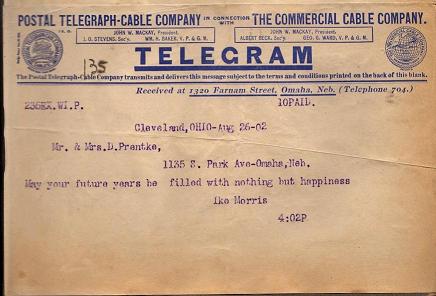
Sending messages
In class we looked at some forms of sharing short and sweet messages.
Wait, not like that!
We have newer ways to share messages now. For a start we can use mobile phones to do this by sending short strings of text called SMS:
Or with newer smart phones we can use SMS in this way:
This is an example of one IM service:
Students could be given guidance to use IM as a tool for collaborating on work outside of class hours. It could also be used to hold written conversations with students from other classes either within the school or from schools around the world. Newer mobile phones come with the ability to connect to the internet which means that you can use IM services from your phone, anywhere, at any time!
The possibilities for using messages and polling as part of lessons seem to only be limited by our own creativity. To finish on, here is an account by a teacher of how he turned catching a student using their phone under the desk into a positive learning experience for the class.
 |
| Image source: Romich foundation |
We have newer ways to share messages now. For a start we can use mobile phones to do this by sending short strings of text called SMS:
 |
| Image source: HowStuffWorks |
 |
| Image source: MacThemes |
So many people have mobile phones now that even a large proportion of school children have them. We can do some pretty interesting things with phones during lessons if we try! It's an easy way to gain information from people that the students know who aren't in the classroom at the time, or to communicate between groups within the classroom or school.
Mobile phones can even be used to conduct quizzes and polls. Sites such as SMS Poll offer services to use SMSing for polling votes. It looks a little clumsy to me and I'm not sure about using it all the time, but it'd probably make a data collection based lesson a lot more exciting (as well as allowing responses from people the students know who aren't part of the class).
There are also services that provide 'Instant Messaging' (IM) which despite the name does not cover any form of instantly delivered message. Some popular providers of IM services are MSN/Windows Live Messenger, Facebook, Skype and many more!Mobile phones can even be used to conduct quizzes and polls. Sites such as SMS Poll offer services to use SMSing for polling votes. It looks a little clumsy to me and I'm not sure about using it all the time, but it'd probably make a data collection based lesson a lot more exciting (as well as allowing responses from people the students know who aren't part of the class).
This is an example of one IM service:
 |
| Image source: Mashable |
The possibilities for using messages and polling as part of lessons seem to only be limited by our own creativity. To finish on, here is an account by a teacher of how he turned catching a student using their phone under the desk into a positive learning experience for the class.
Friday, 20 May 2011
Collective intelligence
I was really excited about creating my own Storybird and had a great time doing it. Instead of a normal story I decided to use it as a space for summarising my thoughts on what collective intelligence is (or it could be called writing shareable notes with added pretty pictures).
If you'd like a look you can find it here.
When I published my story I was confused because the embed code was no where to be seen. This led me to spending some time researching and I discovered that only public stories can be embedded. Well mine claimed to be public and I checked the settings, even flicked between private and public in case something had gone wrong. After further research I realised that all public stories need to be approved by a moderator before becoming properly public and therefore gaining an embed code. That makes sense to stop bad content coming through the site, I guess.
So now after a week or more of waiting my story quietly flipped back to private one night. I'm going to assume that it wasn't story-like enough and failed moderation. It was quite disappointing for me, especially given that no contact was given about what had happened.
I still think that Storybird is a great resource and I'd been keen to try it with students but perhaps I will avoid using the public option with them. If the situation arose where every student in the class created one and they were all submitted for moderation yet one student was rejected, would it really be good for that student's confidence?
If you'd like a look you can find it here.
When I published my story I was confused because the embed code was no where to be seen. This led me to spending some time researching and I discovered that only public stories can be embedded. Well mine claimed to be public and I checked the settings, even flicked between private and public in case something had gone wrong. After further research I realised that all public stories need to be approved by a moderator before becoming properly public and therefore gaining an embed code. That makes sense to stop bad content coming through the site, I guess.
So now after a week or more of waiting my story quietly flipped back to private one night. I'm going to assume that it wasn't story-like enough and failed moderation. It was quite disappointing for me, especially given that no contact was given about what had happened.
I still think that Storybird is a great resource and I'd been keen to try it with students but perhaps I will avoid using the public option with them. If the situation arose where every student in the class created one and they were all submitted for moderation yet one student was rejected, would it really be good for that student's confidence?
Tuesday, 10 May 2011
Collective intelligence and Wikipedia
When thinking about the term 'collective intelligence' the first thing that comes to my mind is a swarm of aliens communicating through some form of hive mind. I did a quick search through Wikipedia and apparently hive minds come under the category of 'collective consciousness' rather than intelligence, so my mental image was slightly off target.
Great things have been achieved through collaboration and the use of collective intelligence, such as dictionaries and encyclopaedias, or even the Apollo program. These days with the help of the internet we can see, and even be part of, a range of collective intelligence projects. Wikipedia, for example, shows how a large group of people can work together to organise their combined knowledge in encyclopaedia format. There are some very special things about Wikipedia. It's an amazingly large body of information that covers a huge range of topics, is constantly being updated to account for recent events and even spans multiple languages. All of this and more that has been created by a community of peers with no monetary incentives. However it is not perfect and can sometimes suffer from (mostly unintentional) bias and occasional short-lived vandalism.
I personally find Wikipedia to be a very useful place to go for a summary of any topic that I'm interested in, yet in saying that I never finish my searching there. I've heard a comment suggesting that after reading about a topic on Wikipedia people are more likely to only research further into information that the wiki article included, possibly missing anything that the wiki didn't note. This had never occurred to me before but after thinking about it, I think this has definitely caught me out in the past. Even with its faults I believe that Wikipedia is a great place to drop past for a quick overview of a subject and I'd be very interested in someday setting up a class maintained wiki.
Even though Wikipedia is extremely well known it isn't the only form of internet based collective intelligence out there. There are many websites dedicated to the asking and answering questions within particular interest groups which over time form large sources of knowledge. The Stack Exchange Network has a range of Q&A websites that cover a variety of useful topics such as science, maths, cooking or how to use English. Yahoo also has an open topic Q&A section, sometimes with very strange questions and even stranger responses. Ultimately personal judgement should be used to determine whether the information within any page seems reasonable!
Tuesday, 5 April 2011
Using blogs in education
Lately I've heard a lot of talk about using web 2.0 tools such as blogs as educational resources. I could not understand how this technology might be useful in a classroom setting because to me a blog was something informal, an online diary to be updated in your own time. I started looking around to see what's out there and to my surprise I've come across some interesting ideas.
While looking around at what other teachers and students have done with their blogs these are some of the things that I came across:
http://kidblog.org/ - a free blogging site created specifically for classroom use. This sounds like a good choice of host because the teacher is able to act as the administrator for the entire class. Having control over all the security settings as well as being able to moderate any comments would make the environment much safer to use with children.
I also came across the Twitter tag #Comments4kids - this seems to be a quick and easy way for teachers to encourage people from all around the world to drop past and leave comments for their students. It would surely provide a morale boost for students to receive positive comments on their work, and be especially thrilling if the comments came from people outside their own class. There is always the possibility of negative feedback and trolling in online environments, however moderating the comments for students prior to publishing them would minimise any harm.
The author of The Purple Teapot uses blogging as a way to pose questions for students to answer. Each post briefly describes a topic and then suggests ways for students to respond, often giving an example response. It would be a good way for students to practice writing their take on a topic without having to worry about it being too formal. This blog seems successful with anywhere between twenty to sixty student responses to each post.
While looking around at what other teachers and students have done with their blogs these are some of the things that I came across:
http://kidblog.org/ - a free blogging site created specifically for classroom use. This sounds like a good choice of host because the teacher is able to act as the administrator for the entire class. Having control over all the security settings as well as being able to moderate any comments would make the environment much safer to use with children.
I also came across the Twitter tag #Comments4kids - this seems to be a quick and easy way for teachers to encourage people from all around the world to drop past and leave comments for their students. It would surely provide a morale boost for students to receive positive comments on their work, and be especially thrilling if the comments came from people outside their own class. There is always the possibility of negative feedback and trolling in online environments, however moderating the comments for students prior to publishing them would minimise any harm.
The author of The Purple Teapot uses blogging as a way to pose questions for students to answer. Each post briefly describes a topic and then suggests ways for students to respond, often giving an example response. It would be a good way for students to practice writing their take on a topic without having to worry about it being too formal. This blog seems successful with anywhere between twenty to sixty student responses to each post.
Another style of blogging used by teachers is to display the work done in class by their students. The blog Good Things Come in Small Packages feels primarily aimed at sharing the school activities with family members while using accessible language for children. There are lots of pictures and videos of the work done by the students and some descriptions of the activities that they get up to during class time. Similar yet different is Teacher Tom's blog which also describes what the students get up to, just not in child friendly language. It does have some interesting ideas to share for creative activities though, rather than just presenting work.
These few examples are quite different ways to use blogging technology but they all have their benefits. If I someday set up a class blog I would want to use it to share what the students do in class with their families and depending on the age group, I'd want the language to be accessible. Something that I didn't see done but think would work well is if some of the posts were student written so that ownership of the blog was shared around.
Subscribe to:
Posts (Atom)